Wireless Hdmi Display Wifi Receiver


Wireless Hdmi Display Wifi Receiver
Get an estimate on delivery to your location.
- Pay by card, bank transfer or USSD at checkout
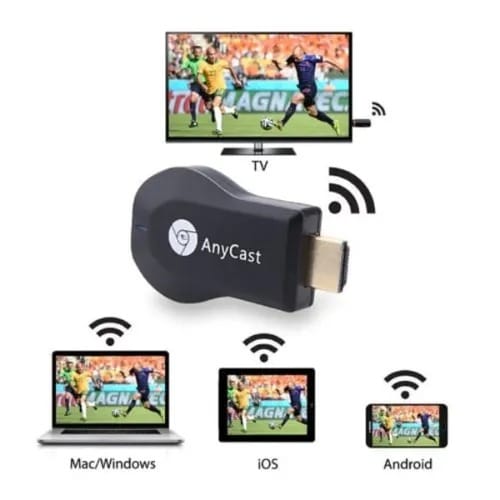
This portable is a special device to project you mobile phones / MID / NoteBook to another big screen devices with HDMI interface (such as, HDTV, Monitor or Projector, etc) through Wi-Fi connection, under the popular standards like Miracast, DLNA and Airplay, it can enhance your TV / Projector / Monitor which have HDMI input socket. Moreover, it has more features such as, streaming video, web surfing, photo viewer, live camera, Internet video and more, just to enjoy excellent multi-display sharing.
Cast your contents (Video, Game, Audio, Picture, App, and File) in your Smart Phones / Tablet PC to another big screen devices with HDMI interface (such as HDTV, Monitor & Projector, etc.) by using Miracast, DLNA, and AirPlay through a WiFi connection. Perfectly to enjoy the ultimate big screen: Watch movies, play games, create your own exclusive cinema. Allows you to enjoy the different audio-visual feast!
Supports various standards (DLNA, Airplay, Miracast) with optimum latency, it can mirror/project your smartphone’s screen to your big screen TV, HDTV, Monitor, Projector, etc with HDMI port.
Easy to use. Just plug and play. No need to download any app. Compatible with most smartphones,tablets, PC, etc with mirror screen feature.
Fully supports 1920x1080p resolution giving you pixel-to-pixel display.
System Requirements for iOS
- iOS 7 and above
- All iPhones after iPhone 4S
- All iPads after iPad 2
- All iPod touch after iPod touch 4 Generation
- Resolution; iPhone – 480*320*1136*640
- iPad – 1024*768*2048*1536
System Requirements for Android
- Android 4.2 and above
- Resolution – WVGA*1080p
How to Use;
- Please connect AnyCast with the micro USB port to any USB adapter (preferably, your TV USB port) to power it up.
- Connect AnyCast HDMI Port to your TV, Projector, Monitor, etc HDMI port and switch screen source to the connected HDMI port
- Once connected, you will see the AnyCast main menu on your TV screen
- Use the botton on the dongle body to switch modes between iOS and Android depending on your phone
- Drag down your phone settings and look for Airplay, Smartview, Miracsat, ChromeCast, Cast, Mirror, Multiview, etc depending on your phone model
- Search for AnyCast, connect and start enjoying HD view on your TV