
Laptop Power Bank 50000mah Dual Portable Usb With Type-c Output


Laptop Power Bank 50000mah Dual Portable Usb With Type-c Output
Get an estimate on delivery to your location.
- Pay by card, bank transfer or USSD at checkout
Product description:
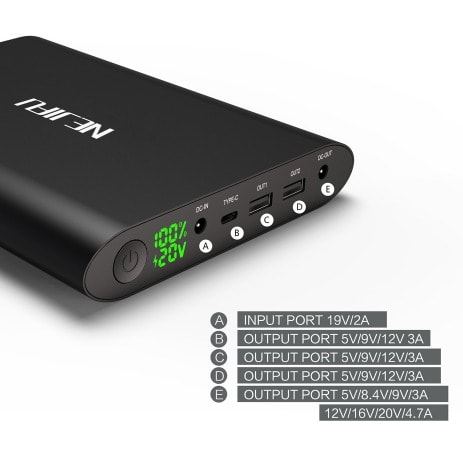
1.This product have six adjustable voltage and can charge digital divices for 5V, 8.4V, 9V, 12V, 16V, (compatible 16.5V),20V(compatible 19V,19.5V).
2.When charging for laptops, first, you press the bottom for two seconds, then you double click on the bottom to adjust the voltage to what laptops need and it can start charging.
3.USB1, USB2 outports can charge digital devices with 5V, 9V, 12V, and support quick charge.
4.TYPE-C output charges 5V,9V,12V digital devices with TYPE-C output.
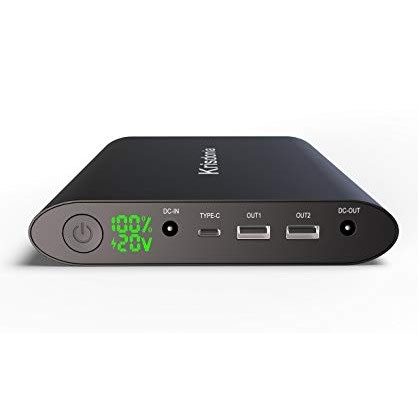
5. All outputs of this product like DC-OUT,USB1,USB2,TYPE-C can charge several devices like laptop, tablet, cell phone simultaneously.
6.Charge for the 50000mAh Power battery
Connect the charger with the DC input port,the other side connect to the adapter.The digital screen showing 100% means it is full charged.
7.Charge for your USB devices
Press the button for 2 seconds to start up,connect the USB cable with output port,it will start charging your devices.The digital screen will light up and show the number of remaining capacity.
8.Charge for your TYPE-C devices
Press the button for 2 seconds to start up,connect the TYPE-C cable with the TYPE-C output port,it will start charging your devices .The digital screen will light up and show the number of remaining capacity.
9.Charge for your notebooks
Press the button for 2 seconds to start up,firstly, you need to confirm the device's charge voltage value, secondly,you change voltage value of this product same to your devices, finally, find your device's adaptor, connect the DC cable with DC output port and your device, then it's ready to charge,the digital screen show the voltage of your device and the number of remaining capacity . (Attention: you must adjust its voltage to the laptops' voltage first)
10.Battery capacity indicator
Press the button for 2 seconds,the screen will light up to show the voltage and the number of remaining capacity.
If the digital screen does not light up by press the button for 2 seconds,the power bank need to be charged.
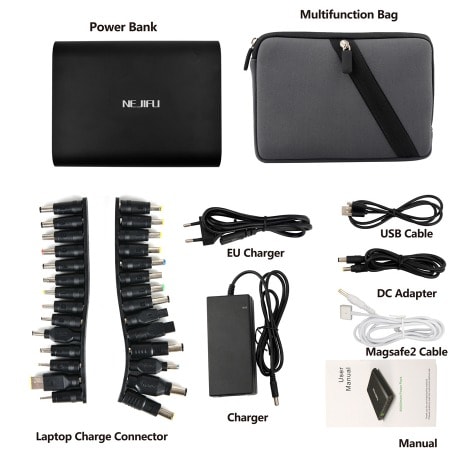
Laptop connector:
6.0/1.4mm FUJITSU - 16V3.36A/16V3.75A/19V3.16A
6.0/1.4mm SONY - 16V3.75A/4A,19.5V2.15A/4.7A, 19.5V3A/4.1A,19V3.16A
5.5/2.5mm ACER - 19V3.42A/4.74A
5.5/2.5mm ASUS - 19V3.42
5.5/2.5mm IBM - 16V3.5A/3.36A,16V4.5A/4.2A
5.5/2.5mm DELL - 19V3.5A
5.5/2.5mm HP/COMPAQ - 18.5V1.1A/4.9A,19V3.16A/4.74A,HP 19V 3.95A
5.5/2.5mm FUJITSU - 19V4.22A
5.5/2.5mm TOSHIBA19V3.16A, 19V3.42A, 19V4.74A,
5.5/2.5mm NEC - 19V3.16A/2.64A
5.5/1.7mm Acer - 19V 2.15A,Aspire one(D270,D257,D250),Aspire one(531h/A110)
4.8/1.7mm HP - 18.5V 3.5A(HP 500HP530 E300)
5.0/1.0mm Samsung - 19V2.1A /4.74A(R458 R480 RV415)
7.4/0.6mm DELL - 9.5V3.34A (M2300 D430)
7.4/0.6mm HP 18.5V 3.5A
7.9/0.9mm IBM - 20V3.25A, 20V4.5A
7.9/0.9mm LENOVO LTEON 20V 3.25A, 20V 4.5A
3.0/1.1mm Samsung-19V/2.1A(NP900X1B 530U3B)
5.0/1.0mm Samsung -19V2.1A /4.74A(R458 R480 RV415)
4.5/3.0mm HP -19.5V3.33A(ENVY14 Pavilion15) etc.